Classic vs Aires in Trading Simulator: What’s the Difference?

Learn how Classic and Aires differ in Trading Simulator, including tools, plans, accounts and statistics.
Table of contents
Classic and Aires are two random simulation modes, not two different plans.
Your plan determines what you have access to. The mode determines how you practise:
Simulator / Simulator PRO = access.
Classic / Aires = training mode.
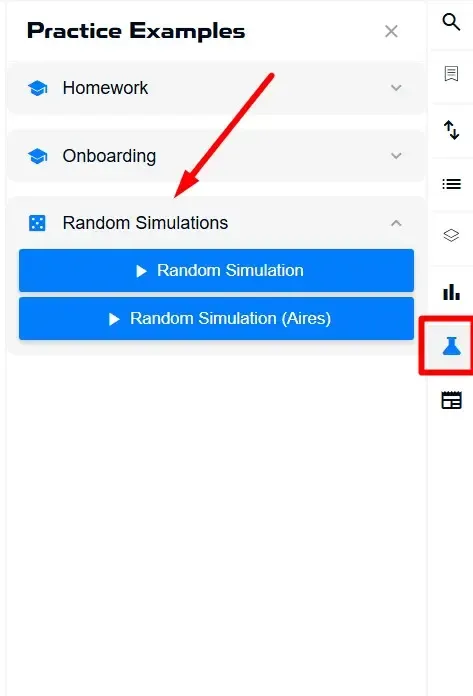
Both modes are launched from the same place: Practice Examples → Random Simulations. The Random Simulation button launches Classic, while Random Simulation (Aires) launches Aires. Choosing a mode does not change your plan, and your plan does not choose the mode for you.
Short answer
Classic is a random simulation without Aires analytics: you see the chart and make decisions on your own. Aires is a random simulation where Trade State, Market Phases, Trade Trust and Price Forecast add analytical context to the chart.
How much of this functionality you can use in Aires depends on your plan, but the mode itself is available on both Simulator and Simulator PRO.
Comparison table
The modes differ in the four Aires tools, available starting timeframes, separate accounts, fast bar progression and history preparation. The trading panel works the same way in both modes.
| Parameter | Classic | Aires |
|---|---|---|
| Launch button | Random Simulation | Random Simulation (Aires) |
| Starting timeframe | Randomly selected from M5, M15, M30 or H1; cannot be changed during the simulation | Randomly selected from M15, M30, H1 or H4; cannot be changed during the simulation |
| Account | Separate account with a starting balance of $10,000 | Separate account with a starting balance of $10,000 |
| Trade State | Not available | Available: structure only on Simulator; structure + flow on Simulator PRO |
| Market Phases | Not available | Available; all four phase types are enabled at startup |
| Trade Trust | Not available | Available on Simulator PRO |
| Price Forecast | Not available | Available on Simulator PRO |
| Fast bar progression | +1 Bar and Bars, with no automatic stops | The same controls, but fast progression automatically stops when the market structure changes |
| History preparation | Additional history is loaded onto the chart | The same, but the starting point is at least 1,100 bars from the beginning of the ticker’s history |
| Trading mechanics | Position size, leverage, TP and SL as percentages, Long and Short, Close All | The same trading panel |
| All-Time Statistics | On Simulator PRO — separate from Aires | On Simulator PRO — separate from Classic |
Classic
Classic is designed for training without structural guidance. The mode deliberately blocks Trade State, Market Phases, Trade Trust and Price Forecast so that you read the market on your own.
The chart, Delta panel and trading panel remain available. You decide where the price is, what is happening with volume and whether there is a reason to enter a trade. No structural overlay makes that decision for you.
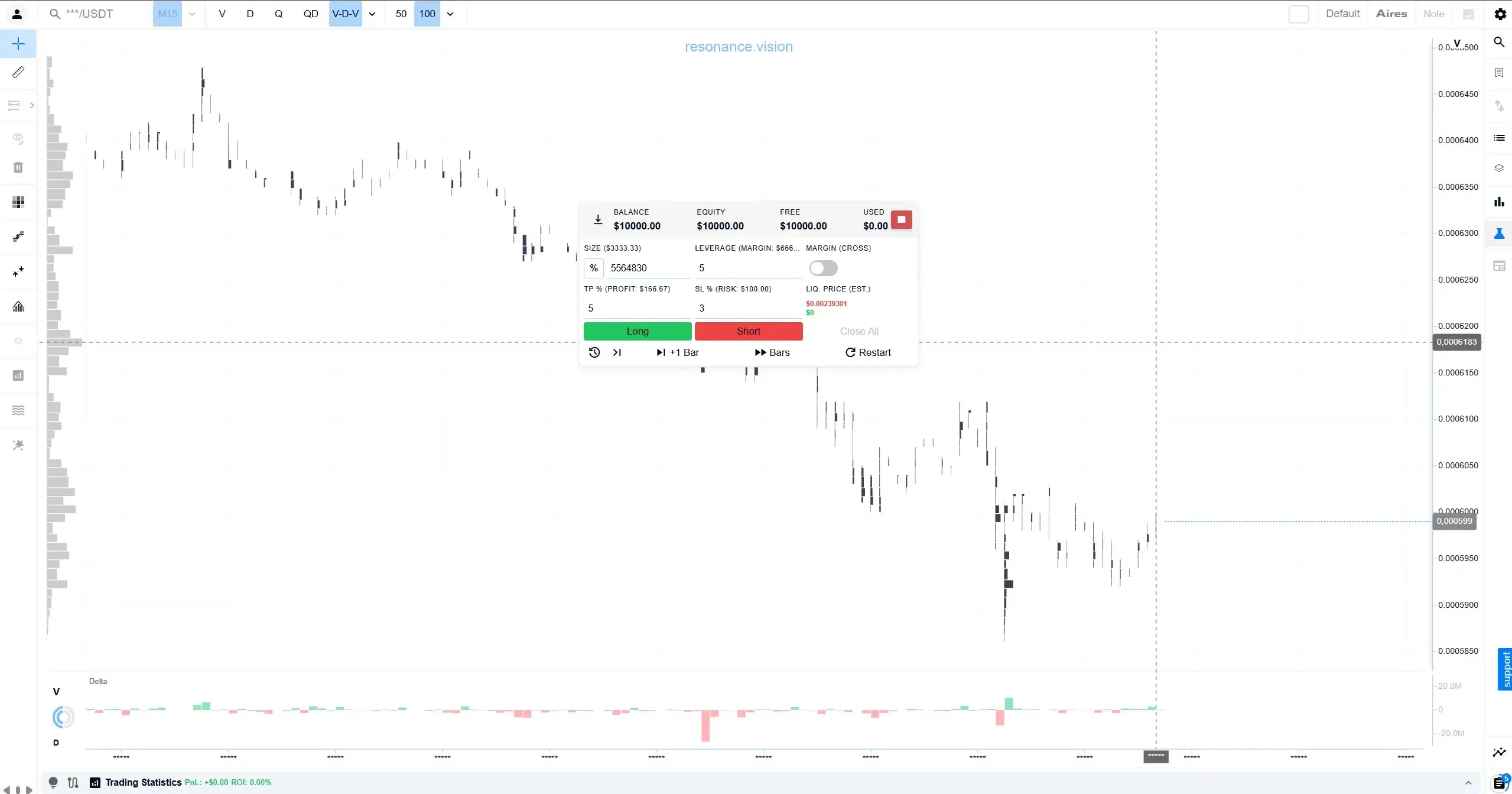
The Aires tool buttons remain visible in Classic, but they are inactive. When you hover over one of them, a tooltip explains that the tool is available only in an Aires simulation. This is not an error or a plan restriction — it is how the mode is designed to work.
Tools that are not part of Aires remain available in Classic: Heatmap, BAS, Statistics histogram and FTT markers. Their extended versions — Heatmap across all tickers and aggregated BAS — depend on your plan rather than the simulation mode.
Classic is useful when you want to:
practise the mechanics: entry, position size, TP and SL;
test how well you can read the chart without ready-made structural guidance;
build statistics based on your own decisions without analytical prompts influencing them.
Aires
Aires is designed for training with analytical context. It adds four tools that are unavailable in Classic: Trade State, Market Phases, Trade Trust and Price Forecast.
What makes Aires different in practice:
The analytical context is connected automatically. Aires tools available on your plan are already enabled when the simulation starts, so you do not need to set them up manually.
There are more analytical layers on the screen. In addition to the chart and Delta, you can see structural zones directly on the chart, phase and period panels across several timeframes, Forecast and Trade Trust.
The horizon is longer. The starting timeframe is M15, M30, H1 or H4. M5 is available only in Classic, while H4 is available only in Aires.
Bar progression stops when the structure changes. When fast progression reaches a bar where a period forms, a trend stops or price breaks out of consolidation, it pauses automatically. To continue, start the progression again.
The account is separate. Trades in Aires do not affect the Classic balance, and vice versa.
The amount of analytical context depends on your plan. On Simulator, you work with Trade State structure and Market Phases. On Simulator PRO, flow is added to Trade State, while Trade Trust and Price Forecast also become available.
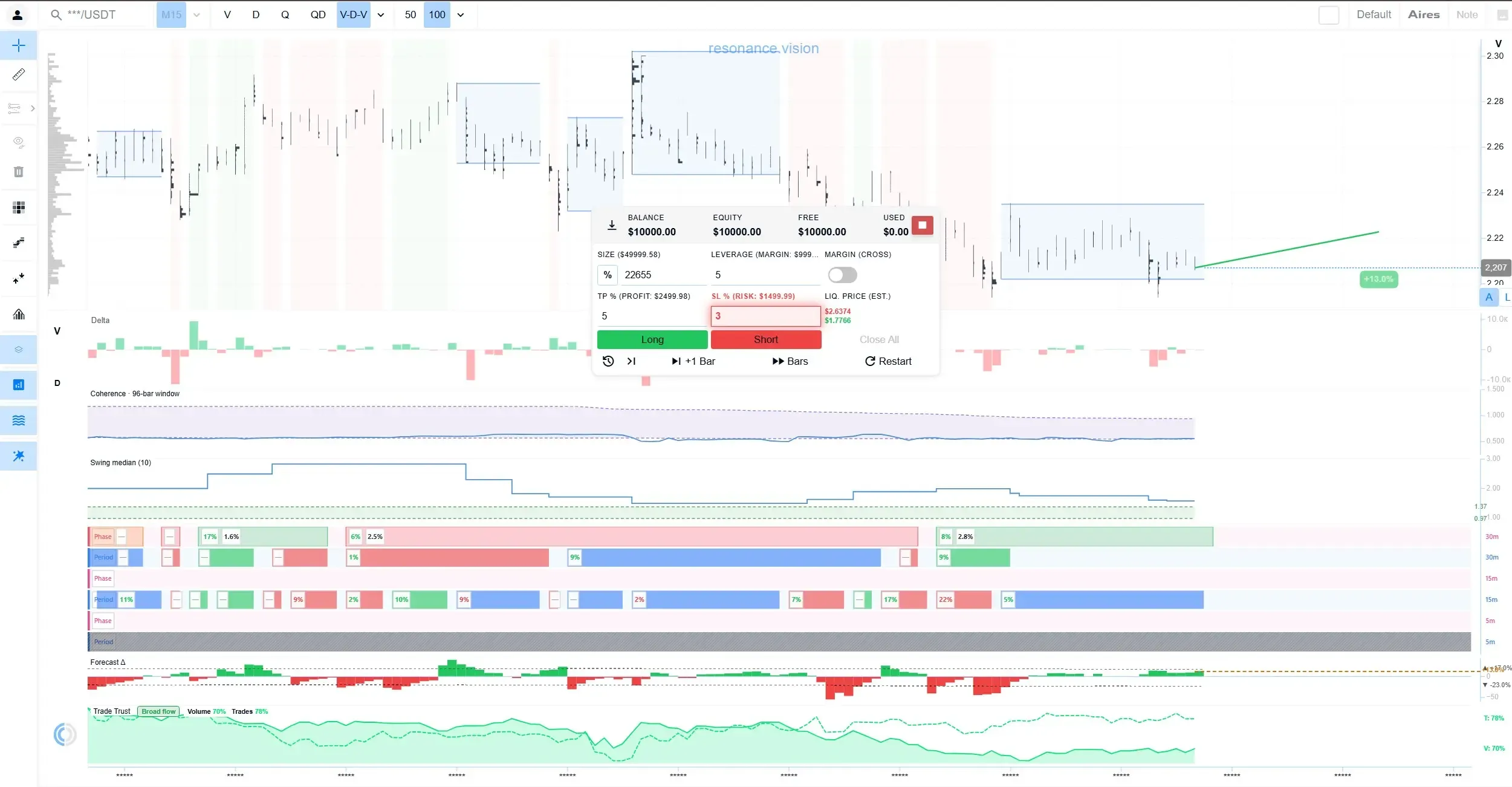
At startup, Aires automatically enables the following analytics available on your plan:
Trade State together with Market Phases. All four phase types are shown: uptrend, downtrend, accumulation and distribution.
Trade Trust with both metrics: confidence in volume and confidence in the number of trades. If you have previously selected which metrics to display, Simulator uses those settings.
Price Forecast together with the Forecast Δ histogram below the chart.
If you manually disable a tool, it will not automatically switch itself back on. The set of tools is enabled when you first enter the simulation and when you change modes. A new ticker or a new simulation within the same session keeps the tool configuration you left in place.
Aires uses a larger amount of historical data so that the analytical context is ready from the start of the simulation.
The trading panel and the +1 Bar and Bars controls are the same as in Classic.
Aires is not the same as Simulator PRO. The mode is available on both plans; your plan only determines how many Aires tools you can use within it.
Separate accounts and statistics
Classic and Aires use separate accounts. Each starts with a balance of $10,000, and results from one mode do not affect the balance of the other.
Statistics are also kept separately. The All-Time Statistics button opens the All-Time Statistics for Random Simulations window, where each mode has its own results. This button is available on Simulator PRO.
The practical reason for keeping them separate is to make the comparison between the two approaches meaningful. If trades from both modes were mixed together, you would not be able to tell whether the result came from your own chart reading or from the Aires context. Separate statistics let you compare Classic and Aires independently.
Compare the modes using similar numbers of trades. Ten positions in one mode versus almost a hundred in the other is not enough for a reliable conclusion: a high Win Rate in a small sample may simply be random.
Why is a tool unavailable in Classic even if you have PRO?
Because an Aires tool appears only when two access conditions are met: the plan and the mode. Simulator PRO satisfies the first condition, but not the second.
| Access condition | What it checks | How to meet it |
|---|---|---|
| Plan | Whether the tool is included in your plan | Have Simulator or Simulator PRO access, depending on the tool |
| Mode | Whether the current simulation supports the tool | Launch Random Simulation (Aires) |
Trade State, Market Phases, Trade Trust and Price Forecast work only in an Aires random simulation. In Classic, they are blocked by the mode, so your plan does not change their availability there. Even with full PRO access, these tool buttons remain inactive in Classic.
How to tell which access condition is blocking a tool:
Mode restriction. The button is inactive and the tooltip says that the tool is available only in an Aires simulation. Launch Random Simulation (Aires). You do not need to change your plan.
Plan restriction. You are already in Aires, but Trade Trust and Price Forecast are unavailable, while Trade State shows structure only. The additional functionality is available on Simulator PRO.
The reverse is also true: launching Aires does not enable PRO. Starting an Aires simulation on the Simulator plan does not add Trade Trust or Price Forecast, because those features depend on access rather than the training mode.
How Aires works on Simulator and Simulator PRO
Aires is available on both plans, but the available toolset differs. The row shows your plan; the column shows the mode you launched.
| Classic | Aires | |
|---|---|---|
| Simulator | Chart, trading panel and core tools: Heatmap for the current ticker, BAS without aggregation, Statistics histogram and FTT markers. Aires tools are blocked. | Everything available in Classic, plus Market Phases and Trade State in structure-only mode: price structure without flow. Trade Trust and Price Forecast are unavailable. |
| Simulator PRO | Everything in Simulator, plus Heatmap across all tickers, aggregated BAS and All-Time Statistics. Aires tools are still blocked. | Full set: Trade State with structure and order flow, Market Phases, Trade Trust, Price Forecast, plus all PRO tools available in Classic. |
How to read the matrix:
Moving horizontally Classic → Aires means changing the simulation mode. You do not need to change your plan — simply use the other launch button.
Moving vertically Simulator → Simulator PRO means changing the plan. This expands the functionality available within the mode you are using, but it does not bring Aires tools into Classic.
Flow is not a separate tool. It is part of Trade State and adds volume data to the structural view. On Simulator, you see price structure only; on Simulator PRO, you see structure together with flow.
The most common mistake is looking for Trade Trust in the lower-left cell. Simulator PRO + Classic gives you the extended Heatmap and BAS functionality, but not Aires tools.
What should you choose?
Choose the mode based on what you want to practise, and the plan based on how much analytical context you need.
| Goal | Mode | Plan |
|---|---|---|
| Learn the mechanics: entry, position size, leverage, TP and SL | Classic | Simulator |
| Practise without structural guidance | Classic | Simulator or Simulator PRO |
| Work with market structure | Aires | Simulator |
| Work with structure + flow, Trade Trust and Price Forecast | Aires | Simulator PRO |
| Compare results between the two modes | Classic and Aires separately | Simulator PRO, because All-Time Statistics are required |
A few practical guidelines:
If you are just getting started, choose Classic. There are fewer elements on the screen, so you can focus on the trading panel and bar progression.
If you want to test yourself, stay in Classic on either plan. The mode will not show structural guidance even if you have PRO.
If you are learning to read market structure, launch Aires. The Simulator plan is enough for this: Trade State will show price structure.
If you need the full analytical context, Aires on Simulator PRO adds flow, Trade Trust and Price Forecast.
If you want to understand what works specifically for you, build comparable samples of trades in both modes and compare their All-Time Statistics.
The modes do not exclude each other. Because the accounts are separate, trying Aires will not affect your Classic balance or statistics.
Promo code TOPBLOG gives you a 10% discount on any Resonance tariff plan
Follow new insights in our Telegram channel.
There is no need to invent complex schemes or look for the "grail". Use the Resonance platform tools for market analysis and trading practice.
Trading Simulator is a tool for practising trading decisions and analysing simulation results in a simulated trading environment.
Register via the link and explore the Resonance platform:
OKX | BingX | KuCoin.
Recommended articles